
 Zimo
af883c6544
app创建代码仓库
Zimo
af883c6544
app创建代码仓库
|
11 miesięcy temu | |
|---|---|---|
| .. | ||
| components | 11 miesięcy temu | |
| changelog.md | 11 miesięcy temu | |
| package.json | 11 miesięcy temu | |
| readme.md | 11 miesięcy temu | |
readme.md
next-data-select --当选项过多时,使用下拉菜单展示并选择内容
遇到问题或有建议可以加入QQ群(455948571)反馈
如果觉得组件不错,给五星鼓励鼓励咯!
注意
作者不介意你对组件源码进行改造使用,为了开源更加高效,谢谢你的配合;为了节省不必要的沟通浪费,以下情况请不要再反馈给作者,请自行解决;
在这感各位的理解,我支持开源,但是作者时间有限;谢谢各位的配合;在这里期望我写的小小插件能为你提供便捷;
1.如果你对源码进行了修改使用,请不需要对作者做任何的反馈,作者确实没有空陪你做技术分析解答;
2.如果你引入插件,连插件是否有正常被uniapp框架识别解析都不清楚,请你换个插件使用;
3.如果你引入插件,针对自己项目进行功能改造的,请自行仔细阅读源码并了解其原理,自行改造;这里作者不愿意浪费过多时间进行技术解答;
4.理论上作者不再解决由于本地开发环境问题所导致的插件使用问题,请自行到uniapp官网学习解决;
如果有使用问题请加群
注意:如果插件问题,请务必给一个完整的复现demo,谢谢配合; 点击链接加入群聊前端开发(uniapp插件)】
使用
vue3 + ts 使用
<template>
	<view style="padding:15px;">
		<view style="font-size: 14px;color: #999;padding: 8px;background-color: #f0f0f0;margin-bottom: 6px"><text>1、自定义显示格式</text></view>
		<next-data-select label="下拉框" @change="onchange" format="{text}-{value}-{lable}" :options="options" v-model="testModel" />
		<view style="font-size: 14px;color: #999;padding: 8px;background-color: #f0f0f0;margin-bottom: 6px"><text>2、使用:过滤模式</text></view>
		<next-data-select @change="onchange" :filterable="true" :options="options" v-model="testModel" />
		<view style="font-size: 14px;color: #999;padding: 8px;background-color: #f0f0f0;margin-bottom: 6px"><text>3、使用:过滤多选模式</text></view>
		<next-data-select @change="onchange" :filterable="true" :multiple="true" :options="options" v-model="testModel" />
		<view style="font-size: 14px;color: #999;padding: 8px;background-color: #f0f0f0;margin-bottom: 6px"><text>4、使用:过滤多选模式+收起显示模式</text></view>
		<next-data-select @change="onchange" :collapseTags="true" :filterable="true" :multiple="true" :options="options" v-model="testModel" />
		<view style="font-size: 14px;color: #999;padding: 8px;background-color: #f0f0f0;margin-bottom: 6px"><text>5、使用:过滤多选模式+收起显示模式配置控制</text></view>
		<next-data-select @change="onchange" :collapseTags="true" :collapseTagsNum="2" :filterable="true" :multiple="true" :options="options" v-model="testModel" />
	</view>
</template>
<script setup lang="ts">
import {ref, unref} from 'vue';
const testModel = ref();
const options = ref([
	{
		text: '测试1',
		value: 1,
		lable: '选项1'
	},
	{
		text: '测试2',
		value: 2,
		disabled: true,
		lable: '选项2'
	},
	{
		text: '测试3',
		value: 3,
		lable: '选项3'
	},
	{
		text: '测试4',
		value: 4,
		lable: '选项4'
	},
	{
		text: '测试5',
		value: 5,
		lable: '选项5'
	},
	{
		text: '测试6',
		value: 6,
		lable: '选项6'
	},
	{
		text: '测试7',
		value: 7,
		lable: '选项7'
	},
	{
		text: '测试8',
		value: 8,
		lable: '选项8'
	},
]);
function onchange() {
	console.log(1111111, unref(testModel))
}
</script>
<style lang="scss">
</style>
vue2 使用
<template>
	<view style="padding:15px;">
		<view style="font-size: 14px;color: #999;padding: 8px;background-color: #f0f0f0;margin-bottom: 6px"><text>1、自定义显示格式</text></view>
		<next-data-select label="下拉框" @change="onchange" format="{text}-{value}-{lable}" :options="options" v-model="testModel" />
		<view style="font-size: 14px;color: #999;padding: 8px;background-color: #f0f0f0;margin-bottom: 6px"><text>2、使用:过滤模式</text></view>
		<next-data-select @change="onchange" :filterable="true" :options="options" v-model="testModel" />
		<view style="font-size: 14px;color: #999;padding: 8px;background-color: #f0f0f0;margin-bottom: 6px"><text>3、使用:过滤多选模式</text></view>
		<next-data-select @change="onchange" :filterable="true" :multiple="true" :options="options" v-model="testModel" />
		<view style="font-size: 14px;color: #999;padding: 8px;background-color: #f0f0f0;margin-bottom: 6px"><text>4、使用:过滤多选模式+收起显示模式</text></view>
		<next-data-select @change="onchange" :collapseTags="true" :filterable="true" :multiple="true" :options="options" v-model="testModel" />
		<view style="font-size: 14px;color: #999;padding: 8px;background-color: #f0f0f0;margin-bottom: 6px"><text>5、使用:过滤多选模式+收起显示模式配置控制</text></view>
		<next-data-select @change="onchange" :collapseTags="true" :collapseTagsNum="2" :filterable="true" :multiple="true" :options="options" v-model="testModel" />
	</view>
</template>
<script setup lang="ts">
export default {
	data() {
		options: [
			{
				text: '测试1',
				value: 1,
				lable: '选项1'
			},
			{
				text: '测试2',
				value: 2,
				disabled: true,
				lable: '选项2'
			},
			{
				text: '测试3',
				value: 3,
				lable: '选项3'
			},
			{
				text: '测试4',
				value: 4,
				lable: '选项4'
			},
			{
				text: '测试5',
				value: 5,
				lable: '选项5'
			},
			{
				text: '测试6',
				value: 6,
				lable: '选项6'
			},
			{
				text: '测试7',
				value: 7,
				lable: '选项7'
			},
			{
				text: '测试8',
				value: 8,
				lable: '选项8'
			},
		],
		testModel: ''
	},
	methods: {
		onchange() {
			console.log(1111111, this.testModel)
		}
	}
}
</script>
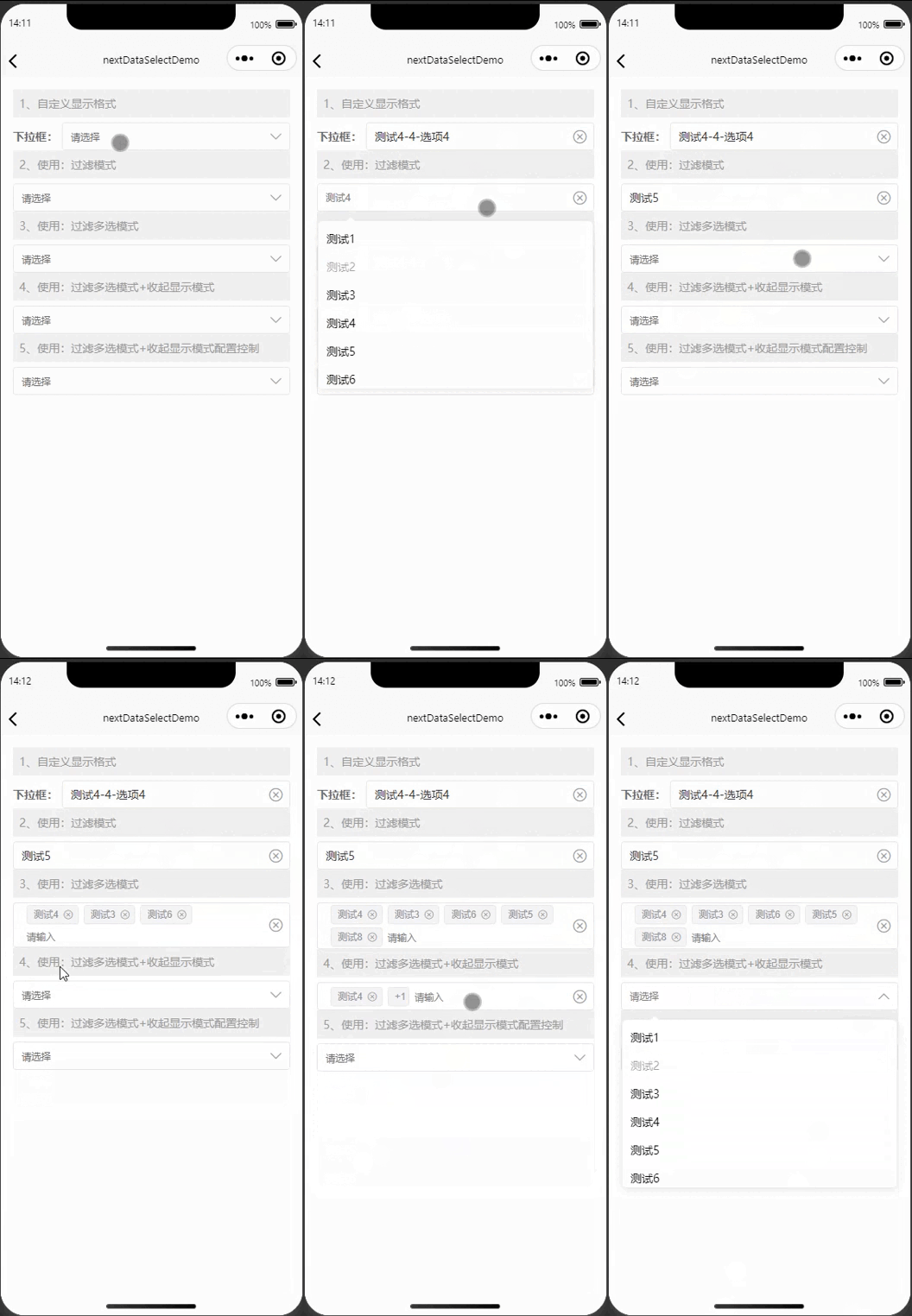
预览
| 功能预览 |
|---|
 |
API
next-data-select Props
| 属性名 | 类型 | 默认值 | 说明 | | - | - | - | - | | v-model | String、Array、Number |- | 选中项绑定值 | | multiple | Boolean | false | 是否多选 | | disabled | Boolean | false | 是否禁用 | | optionsLabelKey | String | "text" | 作为 label 唯一标识的键名 | | optionsValueKey | String | "value" | 作为 value 唯一标识的键名 | | optionsDisabledKey | String | "disabled" | 作为 disabled 唯一标识的键名 | | collapseTags | Boolean | false | 多选时是否将选中值按文字的形式展示| | collapseTagsNum |Number | 1 | 多选时选中值按文字的形式展示的数量| | options | Array |- | 下拉列表本地数据 | | label | String | - | 左侧标题 | placeholder | String | "请选择" | 输入框的提示文字| | emptyTips | String |"无选项" | 无选项提示| | clear | Boolean | true | 是否清空| | themeColor | String | "#f9ae3d" | 主体颜色| | format | String | - | 格式化输出 用法 field="_id as value, version as text, uni_platform as label" format="{label} - {text}"|